Across the country
Eight divisions, sixty-four districts and every thana below them — our readers are wherever the news comes from.


Advertising
Put your message in front of the readers The Mirror Bangla's front page opens for every day. Right beside the lead story, between the category blocks or down the right-hand column — choose from twenty-eight slots in all.
On the map below, the green boxes are the advertising slots, and each one carries its name and its size.
Eight divisions, sixty-four districts and every thana below them — our readers are wherever the news comes from.
Bangla readers living outside the country see the same page, on the same day.
Our pages are laid out for the small screen first, so a banner reaches readers there first too.
From politics to sport, entertainment to video — in the very section whose readers you want to reach.
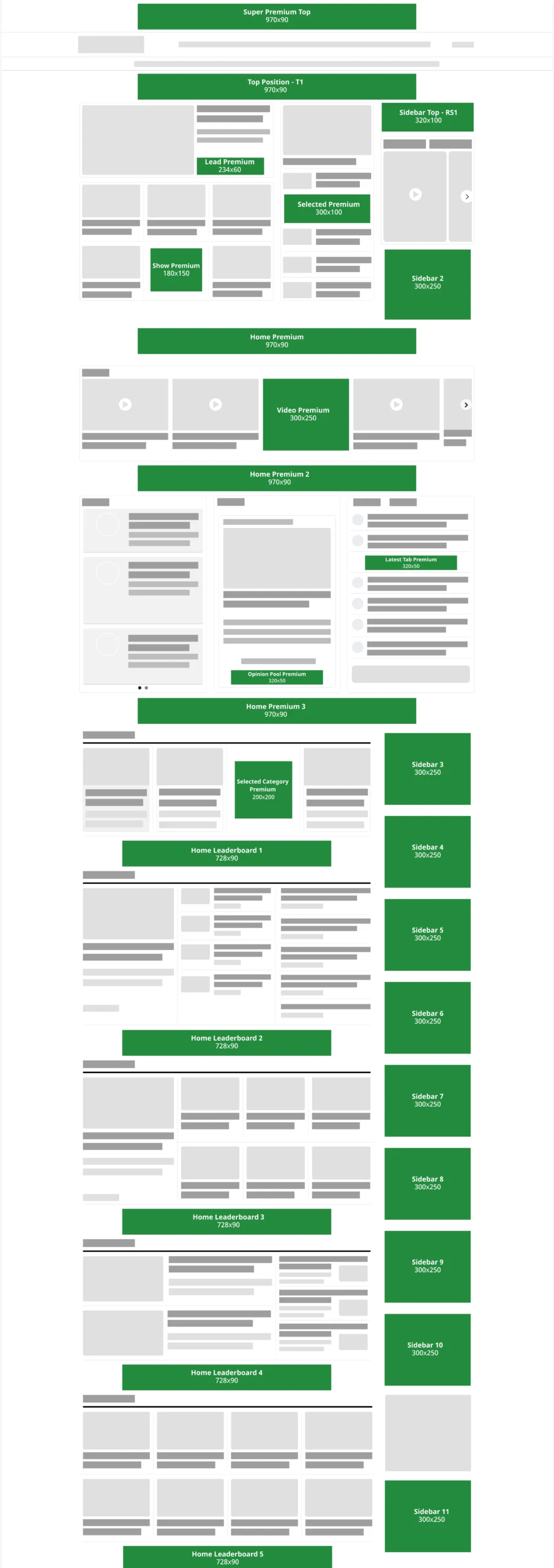
The picture is the whole front page, from top to bottom. The grey boxes are news — photos, headlines, lists — and the green boxes are the advertising slots. Each green box carries that slot's name and its size in pixels.
The slots fall into four families by size. Choose the one that suits you from the list below; the full list follows it.
Five slots, across the full width of the page.
Five slots, between the category blocks.
Eleven slots, down the right-hand column.
Seven slots, among the news cards themselves.
The front page has 28 advertising slots in all. The names below are the ones a booking is made against, so writing the name when you get in touch is the quickest way.
At the very top of the page, above the masthead — the first thing seen on arrival.
Right under the menu bar, before the lead stories begin.
After the lead stories, before the video band.
After the video band, before the opinion and latest blocks.
After the opinion block, before the category news begins.
Under the first category block.
Under the second category block.
Under the third category block.
Under the fourth category block.
Under the fifth category block, towards the end of the page.
The right-hand column’s slots run down beside the page, so the further a reader scrolls, the more new advertisements come into view. Sidebar Top - RS1 is the one exception in this family — it is 320 × 100.
At the very top of the right-hand column. 320 × 100 pixels.
Under the video card, the right-hand column’s second slot.
Level with the start of the category news.
Right under Sidebar 3.
Halfway down the right-hand column.
Right under Sidebar 5.
Level with the second leaderboard.
Right under Sidebar 7.
Level with the third leaderboard.
Right under Sidebar 9.
At the foot of the right-hand column, at the end of the page.
These slots sit inside the rows of news cards, so they are seen while the reader is reading the news. Each one is a different size.
234 × 60 — right beside the lead story’s card.
300 × 100 — in the middle of the selected news column.
180 × 150 — inside the lead block’s row of cards.
300 × 250 — as a card inside the video band’s slider.
320 × 50 — in the middle of the latest news list.
320 × 50 — under the opinion and poll cards.
200 × 200 — inside the selected category’s row of cards.
Banners may be sent as JPG, PNG, WebP or GIF.
Everything in one email gets it done fastest:
A slot booked first is given first.
To protect our editorial independence and our readers' trust, some advertisements are turned away:
The decision to turn an advertisement away is the editorial desk's, and any money paid in advance is then refunded.
Rates depend on the slot and how long it runs, so the full rate card is sent on request.
For any question, write to ads@themirrorbangla.com.